TFA Online Gabor Transform VI
- Updated2023-02-21
- 10 minute(s) read
TFA Online Gabor Transform VI
Owning Palette: Online JTFA VIs
Requires: Advanced Signal Processing Toolkit
Computes the online Gabor transform for signal. Wire data to the signal input to determine the polymorphic instance to use or manually select the instance.
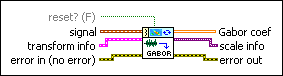
TFA Online Gabor Transform (Waveform)
 |
reset? specifies whether to clear the buffer for the online computation and use the new transform info you specify. The default is FALSE. | ||||||
 |
signal specifies the input signal. | ||||||
 |
transform info specifies the analysis window to use for the Gabor transform. You can use the Dual Window Express VI to design the analysis window. The settings of transform info take effect the first time you run this VI or when you set reset? to TRUE.
| ||||||
 |
error in describes error conditions that occur before this node runs. This input provides standard error in functionality. | ||||||
 |
Gabor coef returns the linear time-frequency representation of the signal. Gabor coef contains the weights of the Gabor elementary functions. The element in the ith row and the jth column is the weight of the Gabor elementary function whose time center and frequency center equal t0+i×dt and f0+j×df, respectively, where dt is the time interval between every two contiguous rows of Gabor coef, and df is the frequency interval between every two contiguous columns of Gabor coef. You can use the TFA Coefficients Indicator to display the magnitude of Gabor coef on an intensity graph. You can save the time-dependent 2D array to a text file for use in another software environment. The resulting text file contains only Z values and does not retain the time axis information or the frequency axis information. You can use the TFA Get Time and Freq Scale Info VI to compute the time scale information and the frequency scale information of the time-frequency representation. |
||||||
 |
scale info returns the time scale and the frequency scale information of the time-frequency representation, including the time offset, the time interval between every two contiguous rows, the frequency offset, and the frequency interval between every two contiguous columns of Gabor coef. Use the TFA Get Time and Freq Scale Info VI to return detailed information about the time scale and the frequency scale. | ||||||
 |
error out contains error information. This output provides standard error out functionality. |

TFA Online Gabor Transform (Real)

|
reset? specifies whether to clear the buffer for the online computation and use the new transform info you specify. The default is FALSE. | ||||||
 |
signal specifies the input signal. | ||||||
|
transform info specifies the analysis window to use for the Gabor transform. You can use the Dual Window Express VI to design the analysis window. The settings of transform info take effect the first time you run this VI or when you set reset? to TRUE.
| ||||||
|
error in describes error conditions that occur before this node runs. This input provides standard error in functionality. | ||||||
 |
sampling rate specifies the sampling rate of signal in hertz. sampling rate must be greater than 0, or this VI sets sampling rate to 1 automatically. The default is 1. | ||||||
|
Gabor coef returns the linear time-frequency representation of the signal. Gabor coef contains the weights of the Gabor elementary functions. The element in the ith row and the jth column is the weight of the Gabor elementary function whose time center and frequency center equal t0+i×dt and f0+j×df, respectively, where dt is the time interval between every two contiguous rows of Gabor coef, and df is the frequency interval between every two contiguous columns of Gabor coef. You can use the TFA Coefficients Indicator to display the magnitude of Gabor coef on an intensity graph. You can save the time-dependent 2D array to a text file for use in another software environment. The resulting text file contains only Z values and does not retain the time axis information or the frequency axis information. You can use the TFA Get Time and Freq Scale Info VI to compute the time scale information and the frequency scale information of the time-frequency representation. |
||||||
|
scale info returns the time scale and the frequency scale information of the time-frequency representation, including the time offset, the time interval between every two contiguous rows, the frequency offset, and the frequency interval between every two contiguous columns of Gabor coef. Use the TFA Get Time and Freq Scale Info VI to return detailed information about the time scale and the frequency scale. | ||||||
|
error out contains error information. This output provides standard error out functionality. |
TFA Online Gabor Transform (Complex)

|
reset? specifies whether to clear the buffer for the online computation and use the new transform info you specify. The default is FALSE. | ||||||
 |
signal specifies the input signal. | ||||||
|
transform info specifies the analysis window to use for the Gabor transform. You can use the Dual Window Express VI to design the analysis window. The settings of transform info take effect the first time you run this VI or when you set reset? to TRUE.
| ||||||
|
error in describes error conditions that occur before this node runs. This input provides standard error in functionality. | ||||||
|
sampling rate specifies the sampling rate of signal in hertz. sampling rate must be greater than 0, or this VI sets sampling rate to 1 automatically. The default is 1. | ||||||
|
Gabor coef returns the linear time-frequency representation of the signal. Gabor coef contains the weights of the Gabor elementary functions. The element in the ith row and the jth column is the weight of the Gabor elementary function whose time center and frequency center equal t0+i×dt and f0+j×df, respectively, where dt is the time interval between every two contiguous rows of Gabor coef, and df is the frequency interval between every two contiguous columns of Gabor coef. You can use the TFA Coefficients Indicator to display the magnitude of Gabor coef on an intensity graph. You can save the time-dependent 2D array to a text file for use in another software environment. The resulting text file contains only Z values and does not retain the time axis information or the frequency axis information. You can use the TFA Get Time and Freq Scale Info VI to compute the time scale information and the frequency scale information of the time-frequency representation. |
||||||
|
scale info returns the time scale and the frequency scale information of the time-frequency representation, including the time offset, the time interval between every two contiguous rows, the frequency offset, and the frequency interval between every two contiguous columns of Gabor coef. Use the TFA Get Time and Freq Scale Info VI to return detailed information about the time scale and the frequency scale. | ||||||
|
error out contains error information. This output provides standard error out functionality. |
Examples
Refer to the following VIs for examples of using the TFA Online Gabor Transform VI:
- Online Noise Reduction VI: labview\examples\Time Frequency Analysis\TFAApplications
- Voice Enhancement VI: labview\examples\Time Frequency Analysis\TFAApplications
- Online Pitch Shifting VI: labview\examples\Time Frequency Analysis\TFAApplications