LabVIEW Advanced Signal Processing Toolkit API Reference

SI Estimate FRF VI

  • Updated2023-02-21
  • 16 minute(s) read

SI Estimate FRF VI

Owning Palette: Frequency-Domain Model Estimation VIs

Requires: Advanced Signal Processing Toolkit or Control Design and Simulation Module

Estimates the frequency response function (FRF) of an unknown system. Use the FRF to estimate a transfer function (TF) model or a state-space (SS) model of the system.

Wire data to the stimulus signal and response signal inputs to determine the polymorphic instance to use or manually select the instance.

Details  

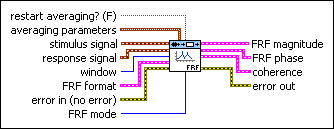
SI Estimate FRF (SISO Waveform)

restart averaging? specifies whether to restart the averaging process. The default is FALSE. When you call this VI for the first time, the averaging process restarts automatically. You might need to restart averaging if a major input change occurs in the middle of the averaging process.
averaging parameters specifies how this VI computes the averaged FRF.
averaging mode specifies the averaging mode.
Note  If averaging mode is No averaging, this VI ignores the weighting mode, number of averages, and FRF mode parameters.


0No averaging (default)
1Vector averaging
2RMS averaging
weighting mode specifies the weighting mode for RMS and vector averaging.

0Linear
1Exponential (default)
number of averages specifies the number of averages that this VI uses for RMS and vector averaging. If weighting mode is Exponential, the averaging process is continuous. If weighting mode is Linear, the averaging process stops after this VI computes the number of averages you specify.
stimulus signal specifies the input waveform of the stimulus signal.
response signal specifies the input waveform of the response signal.
window specifies the time-domain window to apply to the stimulus signal and response signal.

0Rectangle
1Hanning (default)
2Hamming
3Blackman-Harris
4Exact Blackman
5Blackman
6Flat Top
74-Term B-Harris
87-Term B-Harris
9Low Sidelobe
11Blackman Nutall
30Triangle
31Bartlett-Hanning
32Bohman
33Parzen
34Welch
60Kaiser
61Dolph-Chebyshev
62Gaussian
FRF format specifies the format of the FRF magnitude and the FRF phase.
dB on? specifies whether magnitude is in decibels or in a linear scale. The default is FALSE, which specifies that this VI expresses magnitude in a linear scale.
unwrap phase? specifies whether to unwrap the phase. Unwrapping the phase eliminates discontinuities with an absolute value greater than pi. When the value is TRUE, this VI unwraps the phase. When the value is FALSE, this VI wraps the phase. The default is FALSE.
convert to degree? specifies whether the unit of phase is in radians or degrees. The default is FALSE, which means the phase is in radians.
error in describes error conditions that occur before this node runs. This input provides standard error in functionality.
FRF mode specifies how this VI computes the frequency response function (FRF). The mode you choose depends on the signal(s) that contain noise.
Note  This parameter applies to RMS averaging only.


0H1 (default)—Minimizes errors in the FRF when noise contaminates the output signal.
1H2—Minimizes errors in the FRF when noise contaminates the input signal.
2H3—Minimizes errors in the FRF when noise contaminates both the input signals and the output signals.
FRF magnitude returns the magnitude of the averaged frequency response and frequency scale.
frequency returns the frequencies, in hertz, at which this VI evaluates the averaged frequency response.
magnitude returns the magnitude of the averaged frequency response. The value of dB on? determines the unit of magnitude.
FRF phase returns the phase of the averaged frequency response and frequency scale.
frequency returns the frequencies, in hertz, at which this VI evaluates the averaged frequency response.
phase returns the phase of the averaged frequency response. The values of unwrap phase? and convert to degrees? determine the unit of phase.
coherence returns the coherence and the frequency scale of the FRF.
frequency returns the frequency scale, in hertz, of the FRF.
value returns the coherence value of the averaged frequency response.
error out contains error information. This output provides standard error out functionality.

SI Estimate FRF (SISO Array)

restart averaging? specifies whether to restart the averaging process. The default is FALSE. When you call this VI for the first time, the averaging process restarts automatically. You might need to restart averaging if a major input change occurs in the middle of the averaging process.
averaging parameters specifies how this VI computes the averaged FRF.
averaging mode specifies the averaging mode.
Note  If averaging mode is No averaging, this VI ignores the weighting mode, number of averages, and FRF mode parameters.


0No averaging (default)
1Vector averaging
2RMS averaging
weighting mode specifies the weighting mode for RMS and vector averaging.

0Linear
1Exponential (default)
number of averages specifies the number of averages that this VI uses for RMS and vector averaging. If weighting mode is Exponential, the averaging process is continuous. If weighting mode is Linear, the averaging process stops after this VI computes the number of averages you specify.
stimulus signal specifies an array that represents the stimulus signal.
response signal specifies an array that represents the response signal.
window specifies the time-domain window to apply to the stimulus signal and response signal.

0Rectangle
1Hanning (default)
2Hamming
3Blackman-Harris
4Exact Blackman
5Blackman
6Flat Top
74-Term B-Harris
87-Term B-Harris
9Low Sidelobe
11Blackman Nutall
30Triangle
31Bartlett-Hanning
32Bohman
33Parzen
34Welch
60Kaiser
61Dolph-Chebyshev
62Gaussian
FRF format specifies the format of the FRF magnitude and the FRF phase.
dB on? specifies whether magnitude is in decibels or in a linear scale. The default is FALSE, which specifies that this VI expresses magnitude in a linear scale.
unwrap phase? specifies whether to unwrap the phase. Unwrapping the phase eliminates discontinuities with an absolute value greater than pi. When the value is TRUE, this VI unwraps the phase. When the value is FALSE, this VI wraps the phase. The default is FALSE.
convert to degree? specifies whether the unit of phase is in radians or degrees. The default is FALSE, which means the phase is in radians.
error in describes error conditions that occur before this node runs. This input provides standard error in functionality.
sampling rate (Hz) specifies the sampling frequency in hertz. The value of sampling rate must be greater than 0. The default is 1.
FRF mode specifies how this VI computes the frequency response function (FRF). The mode you choose depends on the signal(s) that contain noise.
Note  This parameter applies to RMS averaging only.


0H1 (default)—Minimizes errors in the FRF when noise contaminates the output signal.
1H2—Minimizes errors in the FRF when noise contaminates the input signal.
2H3—Minimizes errors in the FRF when noise contaminates both the input signals and the output signals.
FRF magnitude returns the magnitude of the averaged frequency response and frequency scale.
frequency returns the frequencies, in hertz, at which this VI evaluates the averaged frequency response.
magnitude returns the magnitude of the averaged frequency response. The value of dB on? determines the unit of magnitude.
FRF phase returns the phase of the averaged frequency response and frequency scale.
frequency returns the frequencies, in hertz, at which this VI evaluates the averaged frequency response.
phase returns the phase of the averaged frequency response. The values of unwrap phase? and convert to degrees? determine the unit of phase.
coherence returns the coherence and the frequency scale of the FRF.
frequency returns the frequency scale, in hertz, of the FRF.
value returns the coherence value of the averaged frequency response.
error out contains error information. This output provides standard error out functionality.

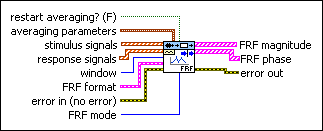
SI Estimate FRF (MIMO Waveform)

restart averaging? specifies whether to restart the averaging process. The default is FALSE. When you call this VI for the first time, the averaging process restarts automatically. You might need to restart averaging if a major input change occurs in the middle of the averaging process.
averaging parameters specifies how to compute the averaging process.
averaging mode specifies the averaging mode.
Note  If averaging mode is No averaging, this VI ignores the weighting mode, number of averages, and FRF mode parameters.


0No averaging (default)
1RMS averaging
weighting mode specifies the weighting mode for RMS averaging.

0Linear
1Exponential (default)
number of averages specifies the number of averages that this VI uses for RMS averaging. If weighting mode is Exponential, the averaging process is continuous. If weighting mode is Linear, the averaging process stops after this VI computes the number of averages you specify.
stimulus signals specifies the input waveform array of the stimulus signals. Each element of the array is the waveform of one stimulus signal.
response signals specifies the input waveform array of the response signals. Each element of the array is the waveform of one response signal.
window specifies the time-domain window to apply to the stimulus signals and response signals.

0Rectangle
1Hanning (default)
2Flat Top
3Exponential
FRF format specifies the format of the FRF magnitude and the FRF phase.
dB on? specifies whether magnitude is in decibels or in a linear scale. The default is FALSE, which specifies that this VI expresses magnitude in a linear scale.
unwrap phase? specifies whether to unwrap the phase. Unwrapping the phase eliminates discontinuities with an absolute value greater than pi. When the value is TRUE, this VI unwraps the phase. When the value is FALSE, this VI wraps the phase. The default is FALSE.
convert to degree? specifies whether the unit of phase is in radians or degrees. The default is FALSE, which means the phase is in radians.
error in describes error conditions that occur before this node runs. This input provides standard error in functionality.
FRF mode specifies how this VI computers the frequency response function (FRF). If you know that noise contaminates the input or output signals of the unknown system, you can select the mode this VI uses to compute the FRF to minimize the measurement error.
Note  This control applies to RMS averaging only.


0H1 (default)—Minimizes errors in the result when noise contaminates the output signal.
1H2—Minimizes errors in the result when noise contaminates the input signal.
2H3—Minimizes errors in the result when noise contaminates both the input signals and the output signals.
FRF magnitude returns the magnitude of the averaged frequency response and frequency scale.
frequency returns the frequencies, in hertz, at which this VI evaluates the averaged frequency response.
magnitude returns the magnitude of the averaged frequency response. The value of dB on? determines the unit of magnitude.
FRF phase specifies the phase of the averaged frequency response and frequency scale.
frequency returns the frequencies, in hertz, at which this VI evaluates the averaged frequency response.
phase returns the phase of the averaged frequency response. The values of unwrap phase? and convert to degrees? determine the unit of phase.
error out contains error information. This output provides standard error out functionality.

SI Estimate FRF (MIMO Array)

restart averaging? specifies whether to restart the averaging process. The default is FALSE. When you call this VI for the first time, the averaging process restarts automatically. You might need to restart averaging if a major input change occurs in the middle of the averaging process.
averaging parameters specifies how to compute the averaging process.
averaging mode specifies the averaging mode.
Note  If averaging mode is No averaging, this VI ignores the weighting mode, number of averages, and FRF mode parameters.


0No averaging (default)
1RMS averaging
weighting mode specifies the weighting mode for RMS averaging.

0Linear
1Exponential (default)
number of averages specifies the number of averages that this VI uses for RMS averaging. If weighting mode is Exponential, the averaging process is continuous. If weighting mode is Linear, the averaging process stops after this VI computes the number of averages you specify.
stimulus signals specifies an array that represents the stimulus signals. Each row in the array is one stimulus signal.
response signals specifies an array that represents the response signals. Each row in the array is one response signal.
window specifies the time-domain window to apply to the stimulus signals and response signals.

0Rectangle
1Hanning (default)
2Flat Top
3Exponential
FRF format specifies the format of the FRF magnitude and the FRF phase.
dB on? specifies whether magnitude is in decibels or in a linear scale. The default is FALSE, which specifies that this VI expresses magnitude in a linear scale.
unwrap phase? specifies whether to unwrap the phase. Unwrapping the phase eliminates discontinuities with an absolute value greater than pi. When the value is TRUE, this VI unwraps the phase. When the value is FALSE, this VI wraps the phase. The default is FALSE.
convert to degree? specifies whether the unit of phase is in radians or degrees. The default is FALSE, which means the phase is in radians.
error in describes error conditions that occur before this node runs. This input provides standard error in functionality.
sampling rate (Hz) specifies the sampling frequency in hertz. The value of sampling rate must be greater than 0. The default is 1.
FRF mode specifies how this VI computers the frequency response function (FRF). If you know that noise contaminates the input or output signals of the unknown system, you can select the mode this VI uses to compute the FRF to minimize the measurement error.
Note  This control applies to RMS averaging only.


0H1 (default)—Minimizes errors in the result when noise contaminates the output signal.
1H2—Minimizes errors in the result when noise contaminates the input signal.
2H3—Minimizes errors in the result when noise contaminates both the input signals and the output signals.
FRF magnitude returns the magnitude of the averaged frequency response and frequency scale.
frequency returns the frequencies, in hertz, at which this VI evaluates the averaged frequency response.
magnitude returns the magnitude of the averaged frequency response. The value of dB on? determines the unit of magnitude.
FRF phase specifies the phase of the averaged frequency response and frequency scale.
frequency returns the frequencies, in hertz, at which this VI evaluates the averaged frequency response.
phase returns the phase of the averaged frequency response. The values of unwrap phase? and convert to degrees? determine the unit of phase.
error out contains error information. This output provides standard error out functionality.

SI Estimate FRF Details

When you estimate MIMO systems, both FRF magnitude and FRF phase return a 2D array. Each column of the 2D array corresponds to a signal in stimulus signals. Each row of the 2D array corresponds to a signal in response signals. For example, if stimulus signals is an array of three signals and response signals is an array of five signals, FRF magnitude and FRF phase returns a 2D array that contains three columns and five rows. The first column of the 2D array corresponds to the first signal in stimulus signals. The second row of the 2D array corresponds to the second signal in response signals.