SI Convert Continuous to Discrete Model VI
- Updated2023-02-21
- 3 minute(s) read
SI Convert Continuous to Discrete Model VI
Owning Palette: Model Conversion VIs
Requires: Advanced Signal Processing Toolkit or Control Design and Simulation Module
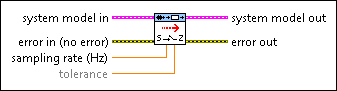
Converts a continuous model to a discrete model using the sampling rate you specify. You can use this VI to convert continuous transfer function, state-space, and zero-pole-gain models to discrete transfer function, state-space, and zero-pole-gain models, respectively.
 |
system model in contains information about the model structure, nominal or estimated parameters, identification result, and so on. Use the Model Management VIs to retrieve the information system model in contains.
|
||
 |
error in describes error conditions that occur before this node runs. This input provides standard error in functionality. | ||
 |
sampling rate (Hz) is the sampling frequency, in hertz, of the corresponding discrete model to which this VI converts the continuous model. | ||
|
tolerance determines zero-pole cancellations. If the difference between the location of a pole and a zero is within the tolerance, this VI removes the zero-pole pair. You can visually inspect the location difference in the pole-zero plot. The default is 1E-12. | ||
 |
system model out returns information about the model structure, nominal or estimated parameters, identification result, and so on. Use the Model Management VIs to retrieve the information system model out contains.
|
||
 |
error out contains error information. This output provides standard error out functionality. |

SI Convert Continuous to Discrete Model Details
This VI accepts only continuous transfer function, state-space, and zero-pole-gain models and converts these continuous models to their discrete equivalents. For ARX, ARMAX, output-error, Box-Jenkins, and general-linear models, use the SI Model Conversion VI to convert these models to transfer function, state-space, or zero-pole-gain models.