Configure a LabVIEW Web Service CORS for Open Access
- Updated2024-05-31
- 2 minute(s) read
Configure a LabVIEW Web Service CORS for Open Access
Configure CORS to allow any origin access to your WebVI resources.
This CORS configuration is the least secure configuration. Any origin can access your web service and application resources. For example, any web page the browser visits could run scripts that make requests to the web service.
What to Use
- LabVIEW Web Service Request
- Set HTTP Header
What to Do
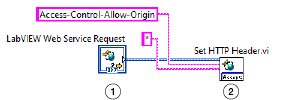
Create the following diagram in a Web Resources VI to configure a LabVIEW Web Service to allow CORS from any origin.

|
A new Web Resources VI automatically adds the LabVIEW Web Service Request class to the block diagram and terminal pane. |

|
Set HTTP Header sets the HTTP header value in response to a request. Use the headerAccess-Control-Allow-Origin to indicate if the origin making the request can access the response of your Web Service VI. Use wildcard (*) as the header value to allow any origin to access your WebVI resource. |
Troubleshooting
- Verify the header and header value are correct.