Unflatten from JSON
- Updated2023-02-17
- 5 minute(s) read
Unflatten from JSON
Converts a UTF-8 JavaScript Object Notation (JSON) string to another data type.

Inputs/Outputs

enable LabVIEW extensions
A Boolean that determines whether JSON extensions support NaN and Inf values of floating-point numbers. Not all JSON parsers support these extensions.
| True | Enable JSON extension support of NaN and Inf values of floating-point numbers. |
| False | Disable JSON extension support of NaN and Inf values of floating-point numbers. |
Default value: True

path
A specific item in the JSON string. Use path if your JSON string contains multiple items and you would like to extract a specific item from it. path uses an array of strings to identify the item, where each element in the array references either the name of a cluster element or an integer index of an array. If you specify an item using path, you must wire a data type to type and defaults that corresponds to the data type of the specified item.
Type/Default Inputs and Corresponding Outputs
Consider the JSON string {"0":"abc","1":false,"2":[9,8,7]}. The following table illustrates an example of type/defaults inputs required for various paths and the resulting value outputs.
| Path | Type and Defaults | Value | Comments |
|---|---|---|---|

|

|

|
If path is empty, type and defaults must account for each element in the JSON string. You must wire a cluster containing a string, a Boolean, and an array to type and defaults. |
 |
|

|
In this example, the path points to the cluster element named 0, or string abc. You must wire a string to type and defaults. |
 |

|

|
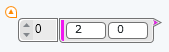
In this example, the path points to the cluster element named 2, which is an array, and the element at index 0 of that array. This element is a floating-point number, so you must wire a DBL numeric to type and defaults. |
JSON string
The flattened UTF-8 string that you want to unflatten.

type and defaults
The data type and default values to which you want to unflatten the JSON string. This input accepts Booleans, integers, floating-point numbers, strings, and arrays or clusters of these types. Cluster elements may be labeled or unlabeled, but not a combination of both. If elements in a cluster are labeled, then each name must be unique to that cluster.

error in
Error conditions that occur before this node runs.
The node responds to this input according to standard error behavior.
Default value: No error
default null elements?
A Boolean that determines how null values in JSON string are processed.
| True | Uses default values from the input cluster for null values in JSON string. |
| False | Returns an error for null values. |
Default value: False
strict validation?
A Boolean that determines whether to return an error when JSON string contains items not defined in type and defaults.
| True | Returns an error when JSON string contains items not defined in type and defaults. |
| False | The JSON object may contain items not defined in type and defaults. |
Default value: False
value
Unflattened data of the same data type and structure as type and defaults.

error out
Error information.
The node produces this output according to standard error behavior.