MC XCP Set Cal Page.vi
- Updated2025-09-25
- 4 minute(s) read
Purpose
Sets a calibration page.
Format
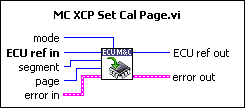
Input

|
Mode is a bit mask described below: |
| Bit | Description |
|---|---|
| 0 | The given page is used by the slave device application. |
| 1 | The slave device XCP driver will access the given page. |
| 2 | Unused. |
| 3 | Unused. |
| 4 | Unused. |
| 5 | Unused. |
| 6 | Unused. |
| 7 | The logical segment number is ignored. The command applies to all segments. |

|
ECU ref in is the task reference which links to the selected ECU. This reference is originally returned from MC ECU Open.vi or MC ECU Select.vi, and then wired through subsequent VIs. | ||||||
|
|
Segment specifies the selected logical data segment number. | ||||||
|
|
Page specifies the logical data page number. | ||||||

|
Error in is a cluster which describes error conditions occurring before the VI executes. If an error has already occurred, the VI returns the value of the error in cluster to error out.
|


Output

|
ECU ref out is the same as ECU ref in. Wire the task reference to subsequent VIs for this task. | ||||||

|
Address is a cluster which contains the following values.
|
||||||
|
|
Error out describes error conditions. If the Error in cluster indicated an error, the Error out cluster contains the same information. Otherwise, Error out describes the error status of this VI.
|


Description
MC XCP Set Cal Page.vi implements the XCP command SET_CAL_PAGE and sets the access mode for a calibration data segment, if the slave device supports calibration data page switching. A calibration data segment and its pages are specified by logical numbers.
Refer to the ASAM XCP Part 2 Protocol Layer Specification for more information on how to set up a request.