Display Error
- Updated2023-02-17
- 3 minute(s) read
Display Error
Opens a dialog that displays details if an error or warning occurs. This node does nothing if no error or warning occurs.
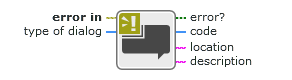
Inputs/Outputs


type of dialog
Type of dialog box to display, if any.
Regardless of this value, this node returns the error information and a message describing the error.
| no dialog |
Displays no dialog box. This is useful if you want to have programmatic control over handling errors. |
| OK message |
Displays a dialog box with a single OK button if an error occurs. After the user clicks OK, this node returns control to the main diagram. |
| continue or stop message |
Displays a dialog box with buttons if an error occurs. The buttons either continue or stop execution. |
| OK message + warnings |
Displays a dialog box with a single OK button if an error or warning occurs. After the user clicks OK, this node returns control to the main diagram. |
| continue/stop + warnings |
Displays a dialog box with buttons if an error or warning occurs. The buttons either continue or stop execution. |
Default value: OK message

error?
A Boolean that indicates if an error occurred.
| True | An error occurred. |
| False | A warning occurred or no error or warning occurred. |

code
The error or warning code.

location
A string describing where the error or warning occurred.
description
The human-readable error description of the error cluster.