UDP Write Function
- Updated2026-07-27
- 3 minute(s) read
Writes to a remote UDP socket.
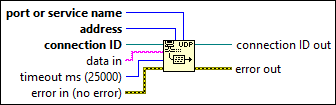
Inputs/Outputs
 port or service name
—
port or service name
—
port or service name can accept a numeric or string input. port or service name identifies what port to write to. If you specify a service name, LabVIEW queries the NI Service Locator for the port number that the server registered.  address
—
address
—
address is the address of the computer where you want to send a datagram.  connection ID
—
connection ID
—
connection ID is a network connection refnum that uniquely identifies the UDP socket.  data in
—
data in
—
data in contains the data to write to another UDP socket. In an Ethernet environment, restrict data to 8192 bytes. In a LocalTalk environment, restrict data to 1458 bytes to maintain gateway performance. timeout ms (25000)
—
timeout ms (25000)
—
timeout ms specifies the time, in milliseconds, that the function waits before the function completes and returns an error. The default value is 25,000 ms or 25 seconds. A value of -1 indicates to wait indefinitely.  error in (no error)
—
error in (no error)
—
error in describes error conditions that occur before this node runs. This input provides standard error in functionality.  connection ID out
—
connection ID out
—
connection ID out returns the same value as connection ID.  error out
—
error out
—
error out contains error information. This output provides standard error out functionality. |
Examples
Refer to the following example files included with LabVIEW.
- labview\examples\Data Communication\Protocols\UDP\UDP Multicast\UDP Multicast.lvproj
- labview\examples\Data Communication\Protocols\UDP\Simple UDP\Simple UDP.lvproj
- labview\examples\Data Communication\Protocols\UDP\UDP Named Service\UDP Named Service.lvproj