Set Variant Attribute Function
- Updated2026-07-27
- 2 minute(s) read
Allows you to change or create an attribute and value for variant data.
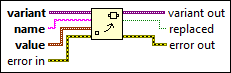
Inputs/Outputs
 variant
—
variant
—
variant is the variant data you want to create an attribute and value for or replace a value for.  name
—
name
—
name is the name of the attribute you want to edit or create. If name matches an attribute, this function replaces the attribute with the value specified. If name does not match an attribute, this function creates a new attribute. If name is an empty string, this function returns error code 1 because an empty string triggers a special behavior in the Delete Variant Attribute function.  value
—
value
—
value is the value of the attribute. This input is polymorphic, so you can wire any data to it.  error in
—
error in
—
error in describes error conditions that occur before this node runs. This input provides standard error in functionality.  variant out
—
variant out
—
variant out is the variant data with new attributes.  replaced
—
replaced
—
replaced is TRUE if an attribute and value were replaced.  error out
—
error out
—
error out contains error information. This output provides standard error out functionality. |