Find answers below to commonly asked questions about the National Instruments LabVIEW graphical development environment.
What is LabVIEW?
NI LabVIEW is a graphical development environment for creating flexible and scalable design, control, and test applications rapidly and at minimal cost. With LabVIEW, engineers and scientists interface with real-world signals; analyze data for meaningful information; and share results through intuitive displays, reports, and the Web. Regardless of programming experience, LabVIEW makes development fast and easy for all users.
Who uses LabVIEW?
Industries worldwide, including automotive, communications, aerospace, semiconductor, electronic design and production, process control, and biomedical, use LabVIEW to increase application development productivity. Applications cover all phases of product development from research to test, manufacturing, and service. There are hundreds of companies with thousands of engineers using LabVIEW to make their companies more and more successful every day.
To see examples of the types of applications that you cancreate with LabVIEW, read LabVIEW customer solutions.
Why should I choose LabVIEW?
One deciding factor for choosing LabVIEW for your test and measurement applications is how fast you can complete the application. In general, you can complete development in LabVIEW four to 10 times faster than in any other programming languages. You achieve this speed because LabVIEW is easy to learn and use and provides tools to make test and measurement applications easier to build. This valuable development time saved goes directly to your bottom line - it gets your products to market faster.
Is LabVIEW a programming language?
LabVIEW is a full-featured graphical programming language that includes all the standard features of a general-purpose programming environment, such as data structures, looping structures, event handling, and object-oriented programming. LabVIEW has a built-in compiler that compiles all code at edit time. However, unlike other general-purpose programming languages, LabVIEW is specifically designed for engineers and scientists and has built-in tools to meet their needs. These high-level functions, assistants, and tools make LabVIEW much more than a programming language.
What is data flow?
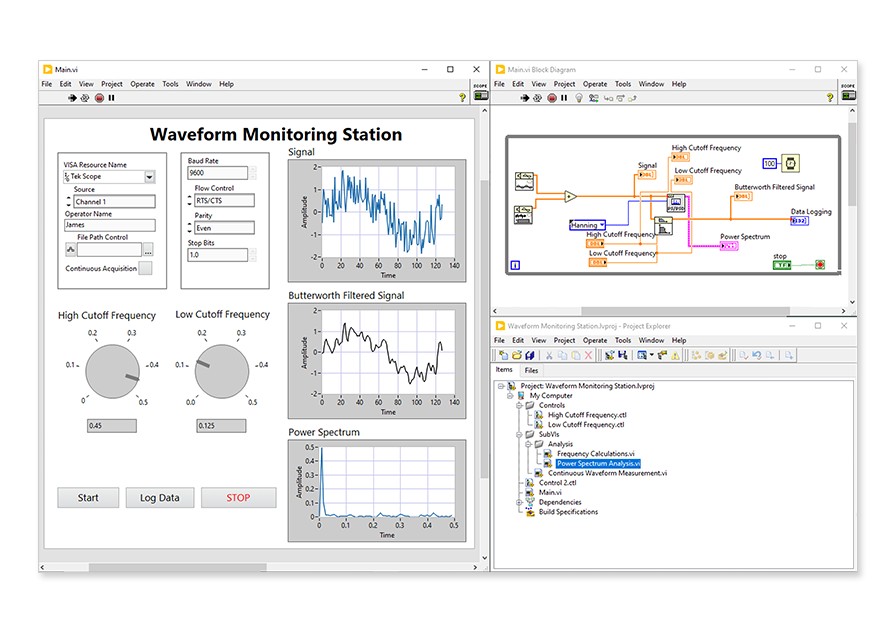
LabVIEW uses a patented dataflow programming model that frees you from the sequential architecture of text-based programming languages. The graphical code is highly intuitive for engineers and scientists familiar with block diagrams and flowcharts. The flow of data between nodes - not sequential lines of text - determines the execution order in LabVIEW, so you easily can create block diagrams that execute multiple operations in parallel. Additionally, the parallel nature of LabVIEW makes multitasking and multithreading simple to implement.
Using the debugging tools available in LabVIEW, you can also watch as data moves through a program and see precisely which data passes from one function to another along the wires, a process known as execution highlighting. This differs from text-based languages, which require you to step from function to function to trace your program execution.
Can LabVIEW handle my signal processing, analysis, and math needs?
LabVIEW includes hundreds of powerful graphical and textual measurement analysis, mathematics, and signal processing functions that seamlessly integrate with LabVIEW data acquisition, instrument control, and presentation capabilities.
For more information on these topics, visit ni.com/analysis.
What are the different LabVIEW development system options?
There are three different LabVIEW packages - the Professional Development System, the Full Development System, and the Base Package, as well as NI Developer Suite. View comparisons of the LabVIEW Base, Full, and Professional development systems to learn more about the different versions of LabVIEW.
For which operating systems is LabVIEW available?
LabVIEW is available for Windows XP/2000, Mac OS, and Linux®. Learn more about OS support for LabVIEW.
Is LabVIEW localized in languages other than English?
In addition to English, there are Japanese, German, French, Korean, and simplified Chinese versions of LabVIEW.
What add-on software is available for LabVIEW?
National Instruments provides many add-on software tools that extend LabVIEW functionality in the following areas:
- Application deployment and targeting
- Software engineering and optimization
- Data management and visualization
- Real-time and FPGA deployment
- Embedded system deployment
- Signal processing and analysis
- Automated test
- Image acquisition and machine vision
- Control design and simulation
- Industrial control
For a full listing of LabVIEW add-on software available from National Instruments, visit ni.com/labview/family.
To learn about hundreds of other LabVIEW add-ons developed by third-party organizations, visit ni.com/labviewtools.
Can I distribute my LabVIEW applications?
LabVIEW has several different distribution mechanisms. You can build your applications into executables, shared libraries (DLLs), and zip files and then distribute the applications for free. You also can distribute your applications using built-in client/server technology for publishing on the Web.
Can I run LabVIEW programs on non-PC platforms?
Yes, you can use LabVIEW to program a real-time operating system, field-programmable gate arrays (FPGAs), handheld devices such as PDAs, touch screen computers, and even 32-bit embedded microprocessors. LabVIEW continues to add new targets as new computing technologies becomes available.
For more information on LabVIEW device targeting add-on software, visit ni.com/labview/family.
How can I begin learning about LabVIEW?
To begin learning about graphical programming with the LabVIEW development environment, you can try LabVIEW online for FREE without downloading or installing any software.
Linux® is a registered trademark of Linus Torvalds in the U.S. and other countries.