Academic Company Events NI Developer Zone Support Solutions Products & Services Contact NI MyNI

NI LabVIEW State Diagram Toolkit

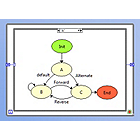
The LabVIEW State Diagram Toolkit assists in large scale application development by providing a framework in which you can build state machines in LabVIEW. With the State Diagram Toolkit, you can create a state machine that reflects a complex decision-making algorithm while LabVIEW simultaneously generates the block diagram code necessary to implement the state machine. The toolkit allows you to automatically:

  • Generate and visually represent state diagrams with robust, easily-maintainable LabVIEW code
  • Add comments that highlight where code is to be added
  • Reflect modifications or additions to the application framework
  • Edit and debug VIs at both the framework and function levels

Description | Demos | Evaluate | Documentation | System Requirements | Pricing and Purchasing

Description

The State Diagram Toolkit adds the State Diagram Editor to LabVIEW, allowing you to visually draw the logic that defines an application. As this visual representation of the logic is created, the State Diagram Editor generates the LabVIEW code that functions as the framework for your application. The logic is represented in code by a series of while loops and case statements, which is very easy to graphically display in LabVIEW. In fact, the graphical nature of LabVIEW already presents an ideal environment for State Diagrams.

When you place a State Diagram structure on the Block Diagram, LabVIEW opens the State Diagram Editor - a tool for drawing state machine diagrams quickly and easily. As you add components such as states and transitions to the state machine diagram, LabVIEW generates code to match each change. The logic for state machines is represented in code by a series of while loops and case statements, which are very easy to graphically display in LabVIEW.

In addition to constructing this logical framework, the State Diagram Toolkit inserts comments in the resulting LabVIEW Block Diagram to indicate where your code should be created. Once you successfully describe the application in the state machine diagram, the LabVIEW code is complete. At any time, your application can easily be modified by reopening the State Diagram Editor and making any changes or adding new features, and LabVIEW will make the resulting changes to your framework.

State diagrams are useful in simplifying the design process of applications that use complex decision-making algorithms. In addition to visualizing the flow of such algorithms, the state diagram is a functional form of application planning. By visualizing the various execution states of an application, you improve the overall design of the application and simplify any redesign of application execution as requirements change.

TOP

Demos

Application Design Patterns: State Machines

TOP

Evaluate

Test drive the State Diagram Toolkit using the fully functional evaluation of the LabVIEW 8 development environment, complete with select LabVIEW add-ons. Easily accessible from your Web browser, this interactive online tool contains hands-on exercises to get you started and guide you through the basic functionality of the State Diagram Toolkit.

Try the State Diagram Toolkit Online

TOP

Documentation

LabVIEW State Diagram Toolkit User Manual

PDF LabVIEW State Diagram Toolkit Product Data Sheet

TOP

System Requirements


  • LabVIEW Full or Professional Development System
  • LabVIEW 7.0 or later
  • Windows 2000/XP, Mac OS X
  • 600 MHz Pentium III processor, 600 MHz G4
  • 256 MB RAM
  • 800 X 600 screen resolution

TOP

Pricing and Purchasing

NI LabVIEW State Diagram Toolkit

TOP

« Back to Toolkits Home