Academic Company Events NI Developer Zone Support Solutions Products & Services Contact NI MyNI

What Is LabWindows/CVI – National Instruments

LabWindows/CVI is a proven ANSI C development environment for test and measurement that greatly increases the productivity of engineers and scientists. For more than 20 years, C developers have used LabWindows/CVI to develop high-performance, stable applications in the manufacturing test, military and aerospace, telecommunications, design validation, and automotive industries. LabWindows/CVI streamlines development with hardware configuration assistants, built-in measurement libraries, comprehensive debugging tools, interactive execution capabilities that developers can use to run functions at design time, and advanced analysis and scientific user interface tools.

“LabWindows/CVI helps protect me from test system obsolescence by consistently maintaining backwards compatibility. Using LabWindows/CVI, not only can I continue to reuse C code that I created 11 years ago, but the code also executes faster with the optimized compiler integration. The National Instruments commitment to backwards compatibility with LabWindows/CVI makes it the de facto standard for military/aerospace test development.”
– Dave Dunham, Senior ATE Systems Engineer, MTI

Top Features


Integrated Environment

Back to Top
Quickly Develop, Debug, and Manage Large Applications

The streamlined tabbed workspace is divided into five main areas: the Project Tree, Library Tree, Window Confinement Region, Output Region, and Debugging Region.

Create and Manage Large Projects With an Intuitive, Convenient Interface

You can easily customize the workspace to fit your specific development style and preferences, as well as integrate with source code control, requirements management, and data management systems.

View the environment in this 8-minute demo


State-of-the-Art Hardware Connectivity

Back to Top
Quickly Connect and Communicate With a Wide Variety of Instruments

With the LabWindows/CVI built-in measurement libraries, you can quickly acquire data from GPIB, USB, serial, Ethernet, PXI, and VXI instruments using the built-in instrument I/O libraries or built-in instrument drivers.

Learn how to develop advanced modular instruments applications with LabWindows/CVI

Simplify the Acquisition Process With Interactive Measurement Tools

LabWindows/CVI streamlines data acquisition and instrument connectivity capabilities with interactive measurement tools. It provides two measurement assistants, which simplify the acquisition process.

Read about the DAQ Assistant

Read about the Instrument I/O Assistant

Communicate With User-Programmable FPGA Hardware

You can use LabVIEW FPGA to create user-programmable field-programmable gate array (FPGA) hardware and then use the FPGA Interface C API and custom function panels to simplify host application development within LabWindows/CVI.

Discover more about creating ANSI C FPGA communication applications


Scientific Advanced Analysis

Back to Top
Use Powerful Algorithms and Functions Designed Specifically for Measurement Analysis and Signal Processing

Condition and transform your signal using smoothing windows, digital filters, and frequency-domain transforms. With these functions, you do not have to write your own algorithms to turn raw data into meaningful information.

View the complete list of LabWindows/CVI analysis functions


Components to Visualize Test and Measurement Data

Back to Top
Quickly and Easily Create Professional Measurement and Automation Graphical User Interfaces (GUIs) in C

Create a custom interface for your measurement applications with measurement-specific user interface components that you can drag, drop, and extend. These controls include buttons, knobs, slides, gauges, tanks, dials, and graphs.


Support for the Latest PC Technologies

Back to Top
Multicore Programming

Executing tasks in parallel often uncovers design flaws that go unnoticed in single-threaded applications – especially when correct application behavior depends on the precise timing of execution, memory access, and communication between multiple tasks. LabWindows/CVI not only provides simplified ANSI C thread synchronization functions and optimized threading constructs to address these challenges but also contains several advanced features that simplify troubleshooting and design optimization on multicore systems.

Learn more about debugging multicore ANSI C applications with LabWindows/CVI

Microsoft .NET

With LabWindows/CVI, take advantage of the latest Microsoft .NET technologies to invoke methods and set and get properties from .NET assemblies. The .NET assemblies are the building blocks of all .NET applications; thus, LabWindows/CVI programmers can use this functionality to call Web services such as those for sending automated e-mails, accessing rich database functionality, and interacting directly with Microsoft Windows API methods including those for viewing CPU use and logging errors.

Internet and XML Libraries

LabWindows/CVI also includes the Internet Library, which you can use to instantly connect your applications to the Web through e-mail, FTP, Telnet, and ping. Send e-mail or text messages to notify operators of specific events, such as a machine overheating. Also log acquired data to an FTP server. In addition, LabWindows/CVI contains an XML function library. The cvixml.fp instrument driver includes functions you can use to create and modify XML documents.


Multiplatform Support

Back to Top
Create Reliable, Deterministic Applications That Target Dedicated Real-Time Hardware

Use the LabWindows/CVI Real-Time Module to reuse existing ANSI C code; target commercial off-the-shelf hardware targets, specifically PXI and PC targets, as well as I/O; and use a single toolchain for real-time and Windows development.

Read the “Bringing Mission-Critical Reliability and Determinism to ANSI C Programmers” white paper

Seamlessly Distribute Your Code to a Linux Target

With the LabWindows/CVI Run-Time Module for Linux create high-performance, stable applications on a Windows system and later compile and run these applications on a Linux target.

Read more about the LabWindows/CVI Run-Time Module for Linux


ANSI C Development Productivity Tools

Back to Top
Create Consistency With the Project Wizard Tool

Share common settings, code, or user interface template when creating new project or source files. The templates can apply to file-naming conventions, code documentation, build and target options, and user interface design.

Navigate an API and Interactively Insert Function Calls With an Easy-to-Use Tool – Function Panels

Help is available for the function itself and each parameter. In addition, you can use function panels to interactively run individual functions with parameters that you specified. With function panels, you can quickly write source code in an interactive window, even automatically insert ampersands (&) before variables to designate memory addresses. If you are developing a custom instrument driver, you can use the function panel HTML generation capabilities to take the documentation included in your instrument drivers or in the open-source instrument drivers available in function panels and generate Web-ready documentation that you can easily distribute and search.

“The design-time prototype help in LabWindows/CVI is extremely effective in determining the correct parameters for my measurement functions.”
– Marco Turra, Software Engineer, HI-TEC

Streamline the Debugging Process

With the Set Next Statement, you can skip code you know is going to fail or investigate code that failed when you executed it. As you debug your application, you can hover over a variable name in the Source window to view and change the variable value using the Editable Data Tooltips tools.

Locate Potential Resource/Memory Leaks Earlier in the Development Process

The Resource Tracking Window tool records and tracks all resources allocated at run time including dynamic memory, file handles, panels, GPIB/TCP handles, and thread pools. Easily go to source code, view memory, break on deallocation, and log tracked resources to disk for later review.

“The built-in Resource Tracking Window in LabWindows/CVI 9.0 has saved me days of adding custom debugging code to track memory and other resource usage. Now with an integrated solution that requires no changes to my code, I have found multiple memory leaks in a matter of minutes. This new feature is invaluable.”
– Chris Quick, Software Engineer, Laser Technology Inc.

Analyze and Optimize Application Run-Time Performance

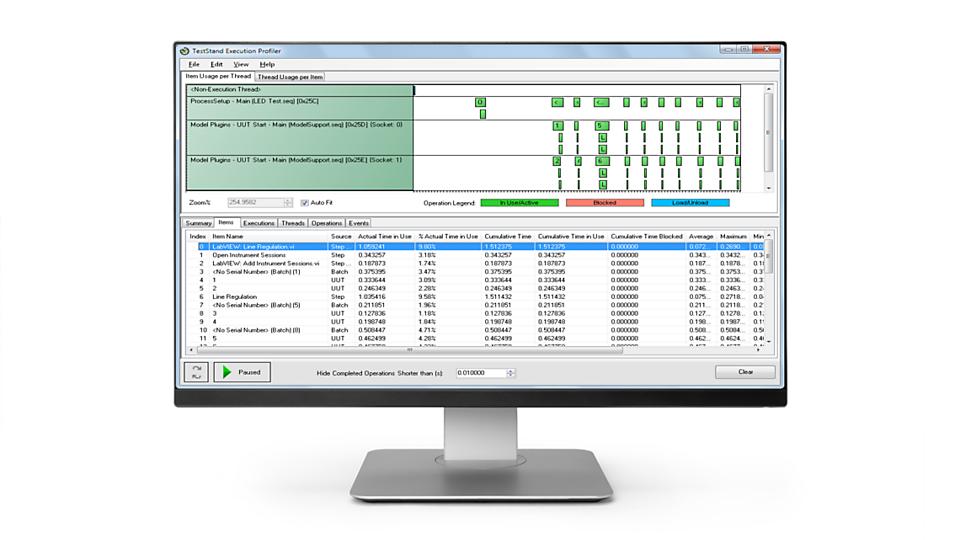
Maximize source code development time and improve application performance using the Execution Profiler Toolkit, which provides a graphical representation of function execution time. This performance measurement tool gives you the ability to easily analyze source code and identify inefficiencies and bottlenecks in your applications that can be optimized for improved performance.

Learn more about the Execution Profiler Toolkit


NI TestStand Test Management Software Integration

Back to Top
Substantially Reduce Development Time and Eliminate Unnecessary Programming

NI TestStand introduces the latest test management software technology for developing automated test systems more quickly and effectively. NI TestStand has features specially designed to develop LabWindows/CVI test systems fast, including a LabWindows/CVI flexible module adapter and NI TestStand user interface controls for LabWindows/CVI.

The flexible module adapter ensures maximum return on your software development investment by increasing code reusability. You now can call functions within any LabWindows/CVI .c, .obj, .lib, or .dll file regardless of the function prototype. The flexible module adapter has also been updated to improve parameter visualization when you configure a module in NI TestStand.

View the NI TestStand home page


Next Steps

Evaluate LabWindows/CVI

Compare LabWindows/CVI Development Systems

The mark LabWindows is used under a license from Microsoft Corporation. Windows is a registered trademark of Microsoft Corporation in the United States and other countries.