NI Vision for LabVIEW

IMAQ OCR Threshold Data 2 VI

  • Updated2023-02-21
  • 16 minute(s) read
Owning Palette: OCR
Requires: NI Vision Development Module

Gets and sets OCR threshold data.

IMAQ OCR Threshold Data

Gets and sets global threshold data.
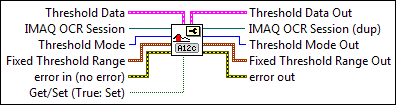
IMAQ OCR Threshold Data

ccclst.gif

Threshold Data specifies parameters that the VI sets if Get/Set is TRUE. The value of this cluster is ignored if Get/Set is FALSE.

cbool.gif

Dark Characters specifies how the characters appear in the image. FALSE indicates that the image contains light characters on a dark background. TRUE indicates that the image contains dark characters on a light background. The default value is TRUE.

ci32.gif

Number of Blocks specifies the number of blocks that OCR uses when Threshold Mode is Linear or Non-linear. Valid values range from 4 to 50.

cnclst.gif

Threshold Limits specifies the upper and lower bounds of the threshold values used to calculate the threshold.

ci32.gif

Lower Value is the lower bound of the calculated threshold value.

ci32.gif

Upper Value is the upper bound of the calculated threshold value.

cbool.gif

Optimize For Speed TRUE enables OCR to use a faster, less accurate threshold calculation algorithm. FALSE enables OCR to use a slower, more accurate threshold calculation algorithm.

cbool.gif

Perform Bi-modal Calculation TRUE enables OCR to calculate both the low and high threshold values when Optimize for Speed is set to TRUE. The default is FALSE. If you set this item to TRUE, Dark Characters is ignored.

crn.gif

IMAQ OCR Session specifies the OCR session on which this VI operates. To create a session, use the IMAQ OCR Create Session VI.

ci32.gif

Threshold Mode specifies the thresholding method that the VI sets when Get/Set is TRUE. This value is ignored if Get/Set is FALSE. For more information, see Optical Character Recognition Concepts and Terminology. The following values are valid:

Fixed Range (0)

Use this mode when you want to specify the low and high threshold values. OCR performs no automatic calculations. This is the fastest thresholding method.

Uniform (1)

Computes a single threshold value for the entire ROI. Uniform is the default.

Linear (2)

Divides the ROI into the number of blocks specified by Number of Blocks, calculates a threshold value for each block, and then uses the value to extract pixel data. Use this mode when the light intensity varies uniformly across the ROI.

Non-linear (3)

Calculates a value on the left side of the ROI, a value on the right size of the ROI, and then fills the middle values in a linear fashion from left to right. The size of the steps from which to calculate the left and right values is based on the value of Number of Blocks.

cnclst.gif

Fixed Threshold Range specifies the fixed threshold range when Threshold Mode is set to Fixed Range and Get/Set is TRUE. Fixed Threshold Range is ignored for all other values of Threshold Mode or if Get/Set is FALSE.

csgl.gif

Lower value specifies the lower bound of the threshold range.

csgl.gif

Upper value specifies the upper bound of the threshold range.

cerrcodeclst.gif

error in (no error) describes the error status before this VI or function runs. The default is no error. If an error occurred before this VI or function runs, the VI or function passes the error in value to error out. This VI or function runs normally only if no error occurred before this VI or function runs. If an error occurs while this VI or function runs, it runs normally and sets its own error status in error out. Use the Simple Error Handler or General Error Handler VIs to display the description of the error code. Use error in and error out to check errors and to specify execution order by wiring error out from one node to error in of the next node.

cbool.gif

status is TRUE (X) if an error occurred before this VI or function ran or FALSE (checkmark) to indicate a warning or that no error occurred before this VI or function ran. The default is FALSE.

ci32.gif

code is the error or warning code. If status is TRUE, code is a nonzero error code. If status is FALSE, code is 0 or a warning code.

cstr.gif

source describes the origin of the error or warning and is, in most cases, the name of the VI or function that produced the error or warning. The default is an empty string.

cbool.gif

Get/Set (True: Set) specifies whether the VI gets or sets the property value. TRUE sets the property value. FALSE gets the property value.

icclst.gif

Threshold Data Out is the current value of the advanced threshold data.

ibool.gif

Dark Characters specifies how the characters appear in the image. FALSE indicates that the image contains light characters on a dark background. TRUE indicates that the image contains dark characters on a light background. The default value is TRUE.

ii32.gif

Number of Blocks specifies the number of blocks that OCR uses when Threshold Mode is Linear or Non-linear.

inclst.gif

Threshold Limits specifies the upper and lower bounds of the threshold values used to calculate the threshold.

ii32.gif

Lower Value is the lower bound of the calculated threshold value.

ii32.gif

Upper Value is the upper bound of the calculated threshold value.

ibool.gif

Optimize For Speed TRUE enables OCR to use a faster, less accurate threshold calculation algorithm. FALSE enables OCR to use a slower, more accurate threshold calculation algorithm.

ibool.gif

Perform Bi-modal Calculation TRUE enables OCR to calculate both the low and high threshold values when Optimize for Speed is set to TRUE.

irn.gif

IMAQ OCR Session (dup) is the reference to the OCR session to which this VI operates.

ii32.gif

Threshold Mode Out is the current value of the thresholding mode.

inclst.gif

Fixed Threshold Range Out is the current value of the fixed threshold range.

isgl.gif

Lower value specifies the lower bound of the threshold range.

isgl.gif

Upper value specifies the upper bound of the threshold range.

ierrcodeclst.gif

error out contains error information. If error in indicates that an error occurred before this VI or function ran, error out contains the same error information. Otherwise, it describes the error status that this VI or function produces. Right-click the error out indicator on the front panel and select Explain Error from the shortcut menu for more information about the error.

ibool.gif

status is TRUE (X) if an error occurred or FALSE (checkmark) to indicate a warning or that no error occurred.

ii32.gif

code is the error or warning code. If status is TRUE, code is a nonzero error code. If status is FALSE, code is 0 or a warning code.

istr.gif

source describes the origin of the error or warning and is, in most cases, the name of the VI or function that produced the error or warning. The default is an empty string.

IMAQ OCR Threshold Data - Local

Gets and sets local threshold data.

IMAQ OCR Threshold Data - Local

cdbl.gif

Niblack Deviation Factor (0.2) specifies the k constant used in the Niblack local thresholding algorithm, which determines the weight applied to the variance calculation. Valid k constants range from 0 to 1. The lower the Deviation Factor, the closer the pixel value must be to the mean value to be selected as part of a particle. Setting the Niblack Deviation Factor to 0 will increase the performance of the VI because the VI will not calculate the variance for any of the pixels.

crn.gif

IMAQ OCR Session specifies the OCR session on which this VI operates. To create a session, use the IMAQ OCR Create Session VI.

cenum.gif

Threshold Mode specifies the thresholding method that the VI sets when Get/Set is TRUE. This value is ignored if Get/Set is FALSE. For more information, see Optical Character Recognition Concepts and Terminology. The following values are valid:

Background Correction (0)

Performs background correction to eliminate non-uniform lighting effects and then performs thresholding using the interclass variance thresholding algorithm.

ccclst.gif

Threshold Data specifies parameters that the VI sets if Get/Set is TRUE. The value of this cluster is ignored if Get/Set is FALSE.

cu32.gif

Look For (Bright Objects) indicates the type of objects for which you want to look. The following values are valid:

Bright Objects (0)

Looks for objects in the image represented by pixels with values greater than the value computed by the threshold method.

Dark Objects (1)

Looks for objects in the image represented by pixels with values less than the value computed by the threshold method.

cnclst.gif

Window Size (32x32) is a cluster specifying the size of the window the VI uses when calculating a local threshold. The window should be sized as large as possible but small enough that each window contains pixels with consistent levels of contrast. The VI will produce inconsistent results for windows that contain uniform pixel values. A typical window should be about the size of the object you want to segment in the image.

ci32.gif

SizeX is the size of the window in the x dimension. The size must be at least 3 and cannot be larger than the width of Image Src.

ci32.gif

SizeY is the size of the window in the y dimension. The size must be at least 3 and cannot be larger than the height of Image Src.

cerrcodeclst.gif

error in (no error) describes the error status before this VI or function runs. The default is no error. If an error occurred before this VI or function runs, the VI or function passes the error in value to error out. This VI or function runs normally only if no error occurred before this VI or function runs. If an error occurs while this VI or function runs, it runs normally and sets its own error status in error out. Use the Simple Error Handler or General Error Handler VIs to display the description of the error code. Use error in and error out to check errors and to specify execution order by wiring error out from one node to error in of the next node.

cbool.gif

status is TRUE (X) if an error occurred before this VI or function ran or FALSE (checkmark) to indicate a warning or that no error occurred before this VI or function ran. The default is FALSE.

ci32.gif

code is the error or warning code. If status is TRUE, code is a nonzero error code. If status is FALSE, code is 0 or a warning code.

cstr.gif

source describes the origin of the error or warning and is, in most cases, the name of the VI or function that produced the error or warning. The default is an empty string.

cbool.gif

Get/Set (True: Set) specifies whether the VI gets or sets the property value. TRUE sets the property value. FALSE gets the property value.

idbl.gif

Niblack Deviation Factor indicates the k constant used in the Niblack local thresholding algorithm.

irn.gif

IMAQ OCR Session (dup) is the reference to the OCR session to which this VI operates.

ii32.gif

Threshold Mode Out is the current value of the thresholding mode.

icclst.gif

Threshold Data Out indicates the threshold parameters that the VI set.

ierrcodeclst.gif

error out contains error information. If error in indicates that an error occurred before this VI or function ran, error out contains the same error information. Otherwise, it describes the error status that this VI or function produces. Right-click the error out indicator on the front panel and select Explain Error from the shortcut menu for more information about the error.

ibool.gif

status is TRUE (X) if an error occurred or FALSE (checkmark) to indicate a warning or that no error occurred.

ii32.gif

code is the error or warning code. If status is TRUE, code is a nonzero error code. If status is FALSE, code is 0 or a warning code.

istr.gif

source describes the origin of the error or warning and is, in most cases, the name of the VI or function that produced the error or warning. The default is an empty string.

IMAQ OCR Threshold Data - Color

Gets and sets color threshold data.
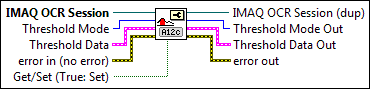
IMAQ OCR Threshold Data - Color

crn.gif

IMAQ OCR Session specifies the OCR session on which this VI operates. To create a session, use the IMAQ OCR Create Session VI.

cu16.gif

Threshold Mode defines the image color format to use for the operation. For more information, see Optical Character Recognition Concepts and Terminology. Choose from the following values:

RGB (0)

(Default) Specifies the color format RGB (red, green, and blue)

HSL (1)

Specifies the color format HSI (hue, saturation, and luminance)

HSV (2)

Specifies the color format HSV (hue, saturation, and value)

HSI (3)

Specifies the color format HSI (hue, saturation, and intensity)

ccclst.gif

Threshold Data is a cluster used to determine the thresholding range for the mode chosen in Threshold Mode.

cnclst.gif

Red or Hue Range is a cluster used to determine the thresholding range for the red or hue plane.

ci32.gif

Lower value is the minimum pixel value in the red or hue plane that is used for the threshold. The default is 0.

ci32.gif

Upper value is the maximum pixel value in the red or hue plane that is used for the threshold. The default is 255.

cnclst.gif

Green or Sat Range is a cluster used to determine the thresholding range for the green or saturation plane.

ci32.gif

Lower value is the minimum pixel value in the green or saturation plane that is used for the threshold. The default is 0.

ci32.gif

Upper value is the maximum pixel value in the green or saturation plane that is used for the threshold. The default is 255.

cnclst.gif

Blue or Luma or Val or Inten Range is a cluster used to determine the thresholding range for the blue, luminance, value, or intensity plane.

ci32.gif

Lower value the minimum pixel value in the blue, luminance, value, or intensity plane that is used for the threshold. The default is 0.

ci32.gif

Upper value the maximum pixel value in the blue, luminance, value, or intensity plane that is used for the threshold. The default is 255.

cerrcodeclst.gif

error in (no error) describes the error status before this VI or function runs. The default is no error. If an error occurred before this VI or function runs, the VI or function passes the error in value to error out. This VI or function runs normally only if no error occurred before this VI or function runs. If an error occurs while this VI or function runs, it runs normally and sets its own error status in error out. Use the Simple Error Handler or General Error Handler VIs to display the description of the error code. Use error in and error out to check errors and to specify execution order by wiring error out from one node to error in of the next node.

cbool.gif

status is TRUE (X) if an error occurred before this VI or function ran or FALSE (checkmark) to indicate a warning or that no error occurred before this VI or function ran. The default is FALSE.

ci32.gif

code is the error or warning code. If status is TRUE, code is a nonzero error code. If status is FALSE, code is 0 or a warning code.

cstr.gif

source describes the origin of the error or warning and is, in most cases, the name of the VI or function that produced the error or warning. The default is an empty string.

cbool.gif

Get/Set (True: Set) specifies whether the VI gets or sets the property value. TRUE sets the property value. FALSE gets the property value.

irn.gif

IMAQ OCR Session (dup) is the reference to the OCR session to which this VI operates.

ii32.gif

Threshold Mode Out is the current value of the thresholding mode.

icclst.gif

Threshold Data Out indicates the threshold parameters that the VI set.

ierrcodeclst.gif

error out contains error information. If error in indicates that an error occurred before this VI or function ran, error out contains the same error information. Otherwise, it describes the error status that this VI or function produces. Right-click the error out indicator on the front panel and select Explain Error from the shortcut menu for more information about the error.

ibool.gif

status is TRUE (X) if an error occurred or FALSE (checkmark) to indicate a warning or that no error occurred.

ii32.gif

code is the error or warning code. If status is TRUE, code is a nonzero error code. If status is FALSE, code is 0 or a warning code.

istr.gif

source describes the origin of the error or warning and is, in most cases, the name of the VI or function that produced the error or warning. The default is an empty string.

Log in to get a better experience