IMAQ Get Depth Image From Stereo VI
- Updated2023-02-21
- 5 minute(s) read
Requires: NI Vision Development Module
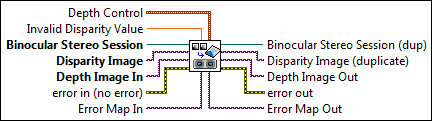
Returns the depth image associated with latest disparity image that was computed. Run this VI after running the IMAQ Stereo Correspondence (Block Matching) VI or IMAQ Stereo Correspondence (SG Block Matching) VI.
 |
Depth Control controls the range of depth values that are valid for the system. If the value is out of range, NaN is returned. |
||||||
 |
Invalid Disparity Value is the pixel value assigned to invalid disparity values in the input Disparity Image. Use the same value that was used either in the IMAQ Stereo Correspondence (Block Matching) VI or IMAQ Stereo Correspondence (SG Block Matching) VI. |
||||||
 |
Binocular Stereo Session is the reference to the binocular stereo vision session on which this VI operates. |
||||||
 |
Disparity Image is the reference to the image that contains the disparity values. This image is the output of the IMAQ Stereo Correspondence (Block Matching) VI or IMAQ Stereo Correspondence (SG Block Matching) VI. |
||||||
|
Depth Image In is a reference to the image that will contain the depth values after this VI runs. |
||||||
 |
error in (no error) describes the error status before this VI or function runs. The default is no error. If an error occurred before this VI or function runs, the VI or function passes the error in value to error out. This VI or function runs normally only if no error occurred before this VI or function runs. If an error occurs while this VI or function runs, it runs normally and sets its own error status in error out. Use the Simple Error Handler or General Error Handler VIs to display the description of the error code. Use error in and error out to check errors and to specify execution order by wiring error out from one node to error in of the next node.
|
||||||
|
Error Map In is the reference to the image that will contain the error estimates of each depth value output in the Depth Image Out image. |
||||||
 |
Binocular Stereo Session (dup) is the reference to the stereo vision session on which this VI operates. |
||||||
 |
Disparity Image (duplicate) is a reference to the input Disparity Image. |
||||||
|
Depth Image Out is a reference to the image that contains the depth values corresponding to the disparity values in the input Disparity Image. |
||||||
 |
error out contains error information. If error in indicates that an error occurred before this VI or function ran, error out contains the same error information. Otherwise, it describes the error status that this VI or function produces. Right-click the error out indicator on the front panel and select Explain Error from the shortcut menu for more information about the error.
|
||||||
|
Error Map Out is the reference to the image that contains the error estimates of each depth value output in the Depth Image Out image. The error value at each pixel gives the maximum error in the computed depth value, and is specified in the units used during calibration. |


Examples
Refer to the following for examples that use this VI.
- LabVIEW\examples\Vision\Stereo Vision\Compute Depth Image\Compute Depth Image.vi