NI-FGEN Error Codes
- Updated2025-10-10
- 1 minute(s) read
When the NI-FGEN driver encounters an error, it returns an error code. This code value can be in hexadecimal, decimal, or text depending on your application. To understand the error code, you need to read the error description.
For example, the error "-1074135039" or "(0xBFFA0001 - Instrument Specific error)" encompasses many different error cases. To better understand the error specific to your application, you need to read the error description.
LabVIEW Example
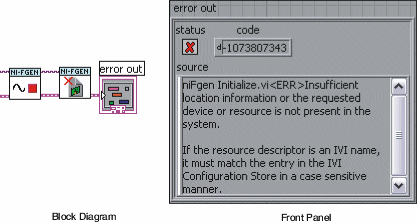
LabVIEW users can read the error description by creating an error indicator from one of the NI-FGEN VIs as shown in the following figure.
C Example
void ErrorBox() {
ViUInt32 errMsgSize;
ViChar* errMsg;
if(error <0) {
errMsgSize = niFgen_GetError(vi, VI_NULL, 0, VI_NULL);
errMsg = (ViChar *) malloc(sizeof(ViChar) * errMsgSize);
niFgen_GetError(vi, &error, errMsgSize, errMsg);
ResetTextBox(fgenPanel, FGEN_PANEL_ERROR_MESSAGE, errMsg);
free(errMsg);
}
else if(error == VI_SUCCESS) ResetTextBox(fgenPanel, FGEN_PANEL_ERROR_MESSAGE, "");
}