DAQmx Create Scale (Map Ranges) VI
- Updated2025-07-28
- 4 minute(s) read
Creates a custom scale that scales values proportionally from a range of pre-scaled values to a range of scaled values.
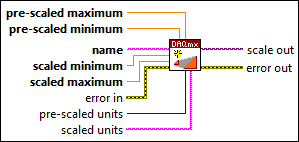
Inputs/Outputs
 pre-scaled maximum
—
pre-scaled maximum
—
pre-scaled maximum is the largest value in the range of pre-scaled values. NI-DAQmx maps this value to scaled maximum.
pre-scaled minimum
—
pre-scaled minimum is the smallest value in the range of pre-scaled values. NI-DAQmx maps this value to scaled minimum.  name
—
name
—
name identifies the custom scale for later use, such as with the DAQmx Create Virtual Channel VI
scaled minimum
—
scaled minimum is the smallest value in the range of scaled values. NI-DAQmx maps this value to pre-scaled minimum. Read operations clip samples that are smaller than this value. Write operations generate errors for samples that are smaller than this value.
scaled maximum
—
scaled maximum is the largest value in the range of scaled values. NI-DAQmx maps this value to pre-scaled maximum. Read operations clip samples that are larger than this value. Write operations generate errors for samples that are larger than this value.  error in
—
error in
—
error in describes error conditions that occur before this VI or function runs. The default is no error. If an error occurred before this VI or function runs, the VI or function passes the error in value to error out. If an error occurs while this VI or function runs, the VI or function runs normally and sets its own error status in error out. Use the Simple Error Handler or General Error Handler VIs to display the description of the error code. Use error in and error out to check errors and to specify execution order by wiring error out from one node to error in of the next node.  pre-scaled units
—
pre-scaled units
—
pre-scaled units is the units of the values to scale.
scaled units
—
scaled units is the units to use for the scaled value. You can use an arbitrary string. LabVIEW uses the units to label a graph or chart.  scale out
—
scale out
—
scale out is a reference to the custom scale this VI creates.  error out
—
error out
—
error out contains error information. If error in indicates that an error occurred before this VI or function ran, error out contains the same error information. Otherwise, error out describes the error status that this VI or function produces. Right-click the error out indicator on the front panel and select Explain Error from the shortcut menu for more information about the error. |