Getting Started with Electric Motor Simulation (Electric Motor Simulation Toolkit)
- Updated2023-02-21
- 2 minute(s) read
The Electric Motor Simulation Toolkit provides built-in models for the simulation. You can simulate an AC induction motor (ACIM), a permanent magnet synchronous motor (PMSM), or a switched reluctance motor (SRM) using this toolkit. The following sections describe the process you use to simulate an ACIM, a PMSM, or an SRM in LabVIEW.
Simulating an ACIM
You can simulate an ACIM by using the constant parameter model function. Use the following flowchart to learn the process of simulating an ACIM. Click on a shape for more information about each concept or simulation process.

Simulating a PMSM
You can simulate a PMSM using the constant parameter model function, the variable parameter model function, or the finite element analysis (FEA) model function. Use the following flowchart to learn the process of identifying a model and simulating a PMSM. Click on a shape for more information about each concept or simulation process.

Simulating an SRM
You can simulate an SRM using either the linear model function or the FEA Model function. Use the following flowchart to learn the process of identifying a model and simulating an SRM. Click on a shape for more information about each concept or simulation process.
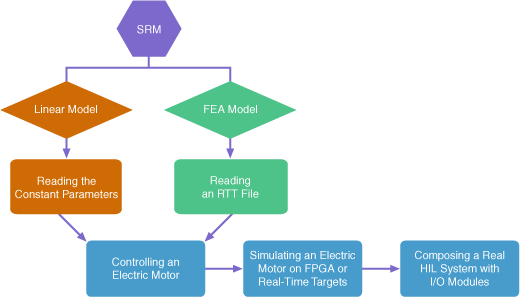
Read through the following topics to simulate an electric motor using the Electric Motor Simulation Toolkit.
- Choosing a Simulation Model
- Preparing the Motor Model
- Controlling an Electric Motor
- Simulating an Electric Motor on FPGA or Real-Time Targets
- Composing a Real HIL System with I/O Modules