SI Estimate AR Model VI
- Updated2023-03-14
- 5 minute(s) read
SI Estimate AR Model VI
Owning Palette: Parametric Model Estimation VIs
Requires: Advanced Signal Processing Toolkit or Control Design and Simulation Module
Estimates the parameters of an AR model for an unknown system. Wire data to the response signal input to determine the polymorphic instance to use or manually select the instance.
SI Estimate AR Model (Waveform)

 |
principle component level (%) defines the percentage of principle components this VI uses. This parameter applies only when method is Principal Component. | ||||||||||
 |
response signal specifies the input waveform of the response signal. The length of response signal must be greater than two times order of AR model. | ||||||||||
 |
order of AR model specifies the order of the AR model. The value of order of AR model must be greater than or equal to 0. | ||||||||||
 |
method specifies the method to use to estimate the AR model.
|
||||||||||
 |
error in describes error conditions that occur before this node runs. This input provides standard error in functionality. | ||||||||||
 |
system model out returns information about the model structure, nominal or estimated parameters, identification result, and so on. Use the Model Management VIs to retrieve the information system model out contains.
|
||||||||||
 |
coefficients of AR model returns the coefficients of the AR model. | ||||||||||
 |
noise returns the disturbance e(t) in the estimated system model. | ||||||||||
 |
error out contains error information. This output provides standard error out functionality. |

SI Estimate AR Model (Array)
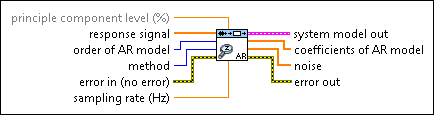
|
principle component level (%) defines the percentage of principle components this VI uses. This parameter applies only when method is Principal Component. | ||||||||||
 |
response signal specifies an array that represents the response signal. The length of response signal must be greater than two times order of AR model. | ||||||||||
|
order of AR model specifies the order of the AR model. The value of order of AR model must be greater than or equal to 0. | ||||||||||
|
method specifies the method to use to estimate the AR model.
|
||||||||||
|
error in describes error conditions that occur before this node runs. This input provides standard error in functionality. | ||||||||||
|
sampling rate (Hz) specifies the sampling frequency in hertz. The value of sampling rate must be greater than 0. sampling rate is ignored if the response signal is a waveforms data file. | ||||||||||
|
system model out returns information about the model structure, nominal or estimated parameters, identification result, and so on. Use the Model Management VIs to retrieve the information system model out contains.
|
||||||||||
|
coefficients of AR model returns the coefficients of the AR model. | ||||||||||
|
noise returns the disturbance e(t) in the estimated system model. | ||||||||||
|
error out contains error information. This output provides standard error out functionality. |
SI Estimate AR Model Details
Refer to the LabVIEW System Identification VIs Algorithm References manual for more information about the forward-backward, least-squares, Yule-Walker, Burg-Lattice, and principal component methods.