Explore LabWindows/CVI Features
The LabWindows/CVI ANSI C integrated programming environment helps you create custom engineering applications. You can use it to manage your project, edit and debug source code, build a user interface, and test code output and performance in one streamlined, tabbed workspace. LabWindows/CVI includes tools for advanced debugging, code documentation, and system deployment so you can integrate source code control, requirements, and data management systems. The software also makes it easier to quickly acquire data from GPIB, USB, serial, Ethernet, PXI, VXI, and FPGA instruments using the built-in instrument I/O libraries, built-in instrument drivers, or the two interactive measurement assistants.
What Can I Do With LabWindows/CVI?
LabWindows/CVI provides an all in one work environment for ANSI C development to create test and measurement applications. Learn more about how LabWindows/CVI can be used in common applications below.

With LabWindows/CVI, you can create and deploy test applications by controlling virtually all your hardware and designing custom user interfaces to improve your development time.

Using LabWindows/CVI, create higher performing test applications by taking advantage of built-in performance analysis tools, parallel execution options and a comprehensive data storage system to optimize your code and your manufacturing test throughput.

With LabWindows/CVI, you can automate the validation of your devices to meet challenging time-to-market and performance requirements. Create flexible applications by taking advantage of seamless hardware integration, custom UI creation and in-depth hardware analysis libraries.

Working with LabWindows/CVI, you can take advantage of the intuitive debugging tools, for single and multi-process tasks, to make refining your test and measurement applications easier and minimizes downtime due to broken code.
Subscription Benefits
Included Services
Every purchase includes access to features that help you be successful with your software:
- Technical support from degreed engineers
- Automatic version updates
- 24/7 access to selected online training and virtual demonstrations
- Access to historical versions in case you need to share code with your team
Which LabWindows/CVI Edition Is Right for My Project?
LabWindows/CVI Base
- Recommended for desktop and real-time measurement applications
- Includes device drivers for NI hardware and third-party instruments
- Includes basic mathematics, signal processing, and debugging tools
LabWindows/CVI Full
- Recommended for inline advanced mathematics, signal generation and signal processing
- Includes an OpenMP library and memory leak detection for test optimization
- Includes SQL tools for database connectivity
HOW TO BUY LabWindows/CVI
Buy LabWindows/CVI for You
A single-seat license of LabWindows/CVI can be associated with an individual or to a specific computer ID.
Buy LabWindows/CVI for Your Team
The Volume License Program is designed for teams that need five or more licenses. It reduces the total cost of ownership by providing streamlined asset management to your organization.
Buy LabWindows/CVI With Automated Test Software Suite
The Automated Test Software Suite is a collection of software for characterizing, validating, and testing electronic devices.
Not Sure Which License Type Is Right for You?
Contact us to learn more.
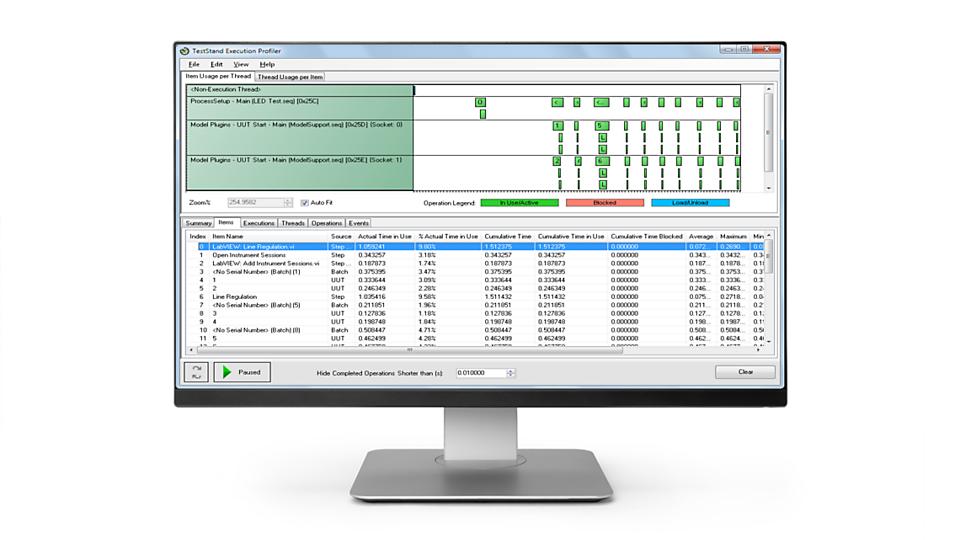
LabWindows/CVI provides a complete ANSI C development environment for creating test and application code. NI recommends using TestStand with LabWindows/CVI to build, deploy, and manage your application code for automated test systems in less time.
TestStand Feature Highlights:
• Customize and automate your tests with code modules written in any language
• Quickly report test results with native report generation and database connectivity
• Efficiently replicate and maintain test systems with the TestStand Deployment Utility and debugging tools
Start Your Free Trial Today
The mark LabWindows is used under a license from Microsoft Corporation. Windows is a registered trademark of Microsoft Corporation in the United States and other countries.
The registered trademark Linux® is used pursuant to a sublicense from LMI, the exclusive licensee of Linus Torvalds, owner of the mark on a worldwide basis.